Storing Uploaded Files and Serving Them in Express: The Definitive Guide
How to Handle Client Uploads Safely, Scale Efficiently, and Serve Assets Like a Pro

Think about the apps you use every day. Whether you are changing your profile picture on a social media app, uploading a PDF receipt to an expense tracker, or attaching a resume to a job board, file uploads are everywhere.
But as a backend developer, what actually happens when a user clicks "Upload"? Where do those bytes go? How do you give them a clean web link (URL) so the frontend can display them? And most importantly, how do you do all of this without letting a hacker upload a malicious script that crashes your entire infrastructure?
If you are building your backend with Node.js and Express, you don't have to guess. Let's build a professional, secure file-handling system from scratch.
1. Where Do Uploaded Files Go? (Local vs Cloud)
When a web browser sends a file to an Express server, the file doesn't magically appear on the hard drive. By default, it floats temporarily in your server's short-term memory (RAM). You have to explicitly tell your application where to save it permanently.
There are two primary architectural pathways you can choose:
Pathway A: The Local Filesystem (Server Disk)
This strategy writes files directly onto the hard drive of the specific machine running your Node.js application.
Best For: Quick setups, development environments, single-server internal tools.
The Reality Check: It is highly efficient for small projects because reading files directly from a local drive has zero network latency. However, it is stateful. If your app grows and you deploy it across multiple servers behind a load balancer, a profile picture uploaded to "Server A" won't exist on "Server B".
Pathway B: Cloud Object Storage (External Storage)
This strategy streams incoming files briefly through memory and shifts them off immediately to an external dedicated cloud vendor like AWS S3 or Google Cloud Storage.
Best For: Production-scale systems, high-traffic consumer apps, microservices.
The Reality Check: It is stateless. Your Express server acts merely as a gateway, not a storage bin. If a server instance crashes or scales down to zero at night, your files remain completely safe in the cloud bucket.
2. Setting Up Local Storage with Multer
For this guide, we will focus on implementing a highly organized local filesystem vault using Multer, the industry-standard middleware for file uploads in Node.js.
First, run npm install multer in your project folder. Let's look at how to configure it cleanly.
The Secure Local Configuration (uploadConfig.js)
import multer from 'multer';
import path from 'path';

// 1. Define the rules for local disk storage
const diskStorageEngine = multer.diskStorage({
  // WHERE: Tell Multer exactly which folder to drop the file into
  destination: (req, file, cb) => {
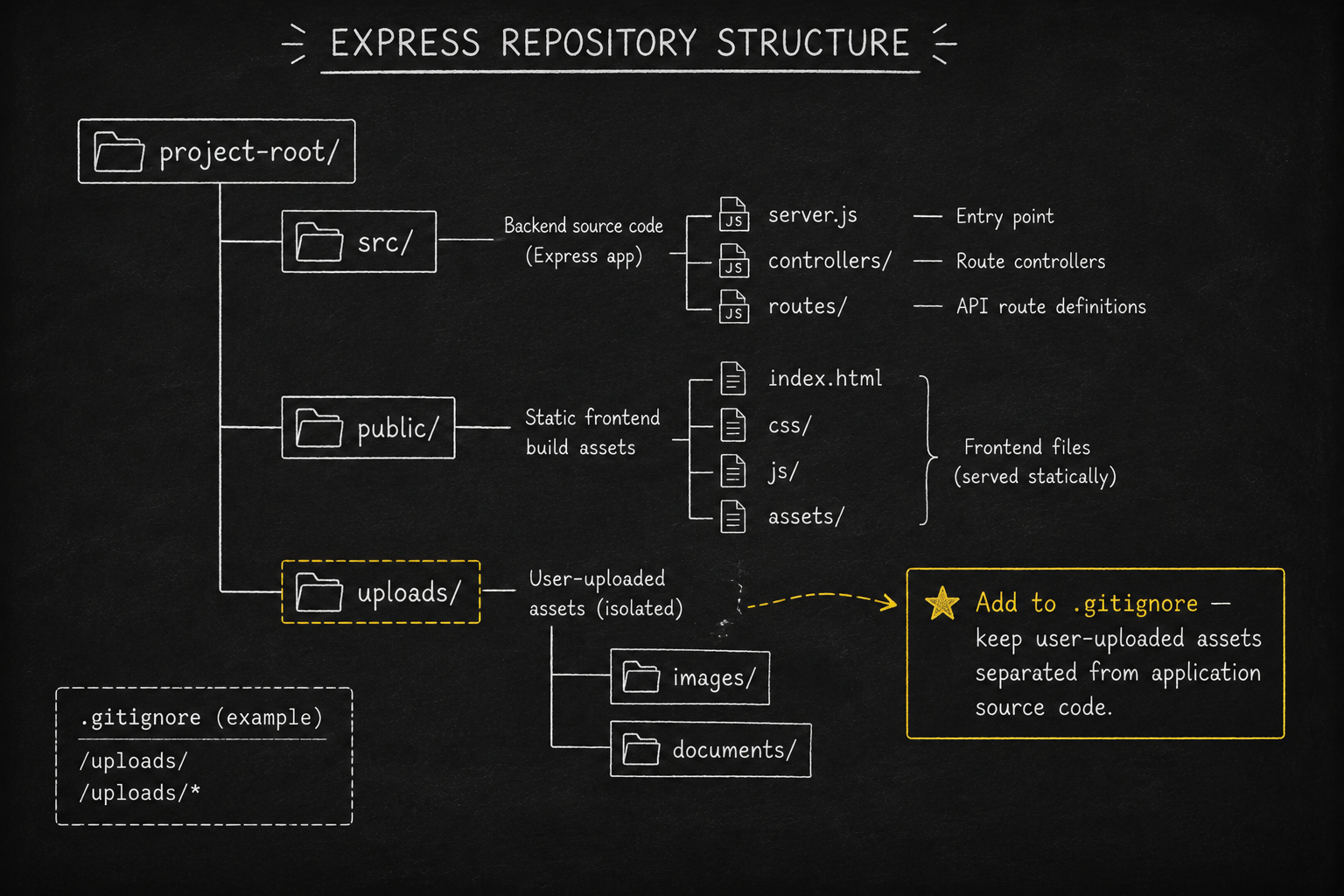
    // We target a dedicated directory called 'uploads' at the project root
    cb(null, './uploads');
  },

  // WHAT: Determine what the stored file should be named
  filename: (req, file, cb) => {
    // CRITICAL SECURITY: Never trust the user's original filename!
    // We generate a unique random string and attach a timestamp prefix to prevent overwriting existing files
    const timestamp = Date.now();
    const randomBits = Math.round(Math.random() * 1E9);
    const fileExtension = path.extname(file.originalname); // Extracts things like '.jpg' or '.png'

    const safeUniqueName = `${timestamp}-${randomBits}${fileExtension}`;
    cb(null, safeUniqueName);
  }
});

// 2. Export the configured instance to use on our routes
export const upload = multer({
  storage: diskStorageEngine,
  limits: {
    fileSize: 2 * 1024 * 1024, // Strict rule: Max file size is 2MB
    files: 1                    // Strict rule: Only 1 file allowed per upload attempt
  }
});
The Architecture Blueprint
To keep your environment clean, keep your uploaded files completely decoupled from your production source code directory.
3. Serving Stored Files Globally via a URL
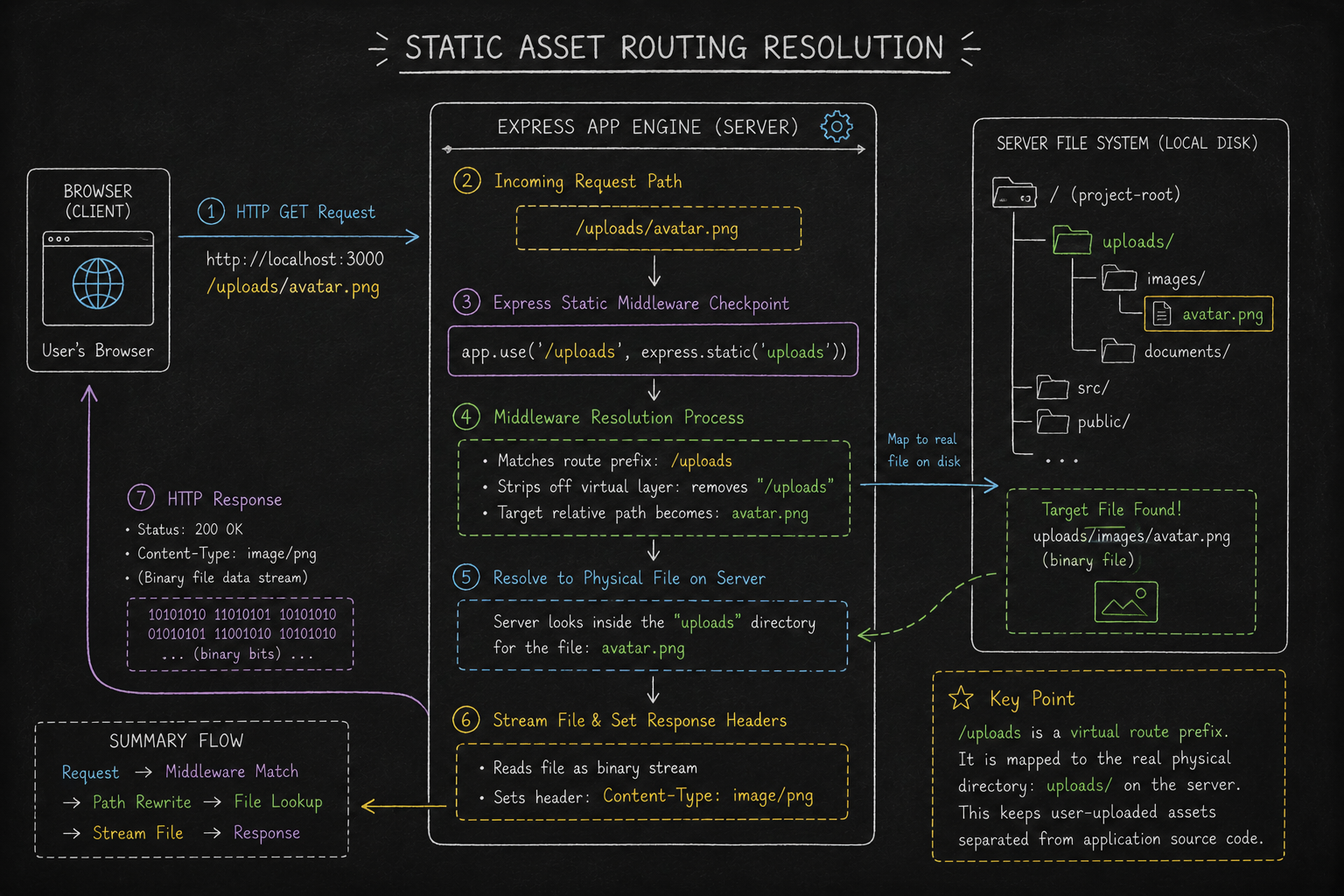
Once a file is written to your server disk, it is simply locked away in storage. If a browser tries to call http://localhost:3000/uploads/my-photo.jpg, the server will return a 404 Not Found because Express doesn't expose directories automatically.
To bridge this gap, we use Express’s built-in express.static middleware. This maps a public web URL prefix directly to a physical folder path on the drive.
The Implementation (server.js)
import express from 'express';
import { upload } from './uploadConfig.js';

const app = express();
const PORT = 3000;

// 1. THE BRIDGE: Map the virtual web URL path '/uploads' to the physical disk folder 'uploads'
app.use('/uploads', express.static('uploads'));

// 2. THE UPLOAD ROUTE: Handle incoming single file posts from users
app.post('/api/avatar/upload', upload.single('avatar'), (req, res) => {
  // If Multer blocks the file or nothing was attached, drop out
  if (!req.file) {
    return res.status(400).json({ error: 'Please upload a valid file.' });
  }

  // 3. DYNAMIC URL BUILD: Construct the complete web path to send back to the client
  // req.protocol extracts 'http' or 'https'
  // req.get('host') extracts your current domain (e.g., 'localhost:3000' or 'mywebsite.com')
  const publicFileUrl = `${req.protocol}://${req.get('host')}/uploads/${req.file.filename}`;

  // Respond with a structured JSON package the frontend can read instantly
  res.status(201).json({
    status: 'Success',
    message: 'File successfully saved to server vault.',
    url: publicFileUrl // Output Example: http://localhost:3000/uploads/17198234-58291.png
  });
});

app.listen(PORT, () => console.log(`Backend vault active on port ${PORT}`));
4. Guardrails: Critical Upload Security
Allowing users to write files to your application server is a major security risk. If you do not install strict defense gates, an attacker can crash your machine or completely gain control of your backend.
Follow these professional defense-in-depth protocols:
1. Enforce Binary Signatures (Magic Numbers)
Never trust the file extension (e.g., assuming invoice.jpg is a safe graphic image). An attacker can easily rename a dangerous application script to image.jpg, tricking standard filters.
- The Fix: Use memory buffering (
multer.memoryStorage()) alongside a dependency library likefile-typeto inspect the Magic Numbers, the actual opening byte sequence inside the file's binary signature. If the inner structural bytes don't match the signature of a JPEG, PNG, or PDF, drop the request instantly.
2. Eradicate Path Traversal Vectors
If you pass the original, user-provided file name straight to a storage handler, an attacker can input a malformed name like ../../etc/passwd or ../../config.env. Express could potentially write the file right on top of your system's password file or environment secrets.
- The Fix: Meticulously rewrite every file name inside your
filenameengine using randomly generated text strings, UUIDs, or clean epoch timestamp arrays.
3. Protect Sensitive/Authenticated Documents
If an asset is stored inside a public directory mounted via express.static, it is completely exposed to the entire internet. Anyone who guesses or finds that URL link can view it instantly.
The Fix: If you are storing sensitive files (medical forms, private identification documents, financial reports), store them inside a restricted folder completely outside your web visibility zone. Create a specific, secure validation route using standard authorization middleware:
// A controlled route implementation for handling private documents
app.get('/api/vault/documents/:filename', checkUserAccessPermission, (req, res) => {
  // 1. If the user passes validation middleware, construct the file path safely
  const isolatedSecurePath = path.join(__dirname, 'private-storage', req.params.filename);

  // 2. Stream the file directly out down the pipe safely
  res.sendFile(isolatedSecurePath);
});
Conclusion: Clean Code, Hardened Servers
File management in Express is all about maintaining clear structure and enforcing strong guardrails. By using a dedicated local directory or pushing data out to scalable cloud object buckets, renaming incoming files dynamically, and creating public routing bridges with express.static, you ensure your system scales smoothly while remaining completely locked down against real-world exploits.


