URL Parameters vs Query Strings in Express.js: The Complete Guide
Mastering Resource Identification and Data Filtering in Modern Node.js Web APIs

Think about how you navigate the web every single day.
When you log into an online store and click on your profile, your browser address bar displays something like https://shop.com/users/42. You are looking at a specific user - User #42.
Now imagine you click on the "Laptops" catalog, but you want to find only laptops under $1,000, sorted by price. The URL changes to something like https://shop.com/products?category=laptops&maxPrice=1000&sort=asc.
Both URLs pass data to the backend server, but they do it in fundamentally different ways. The first uses a URL Parameter (or Route Parameter) to identify what specific thing you want to see. The second uses a Query String to control how you want that list modified, filtered, or sorted.
If you are building backend APIs with Express.js, mixing these two up leads to confusing routes, brittle code, and broken REST architectures. Let's break down the mechanics of URL parameters and query strings, how Express parses them under the hood, and how to choose the right tool for your endpoints.
1. What Are URL Parameters? (The Identifiers)
In Express.js, URL Parameters (often called Route Parameters or Path Parameters) are dynamic segments embedded directly inside the URL path itself.
You use URL parameters when a piece of data is mandatory to identify a specific entity or resource. Without that parameter, the URL points to a completely different place or nowhere at all.
Defining and Capturing Parameters in Express
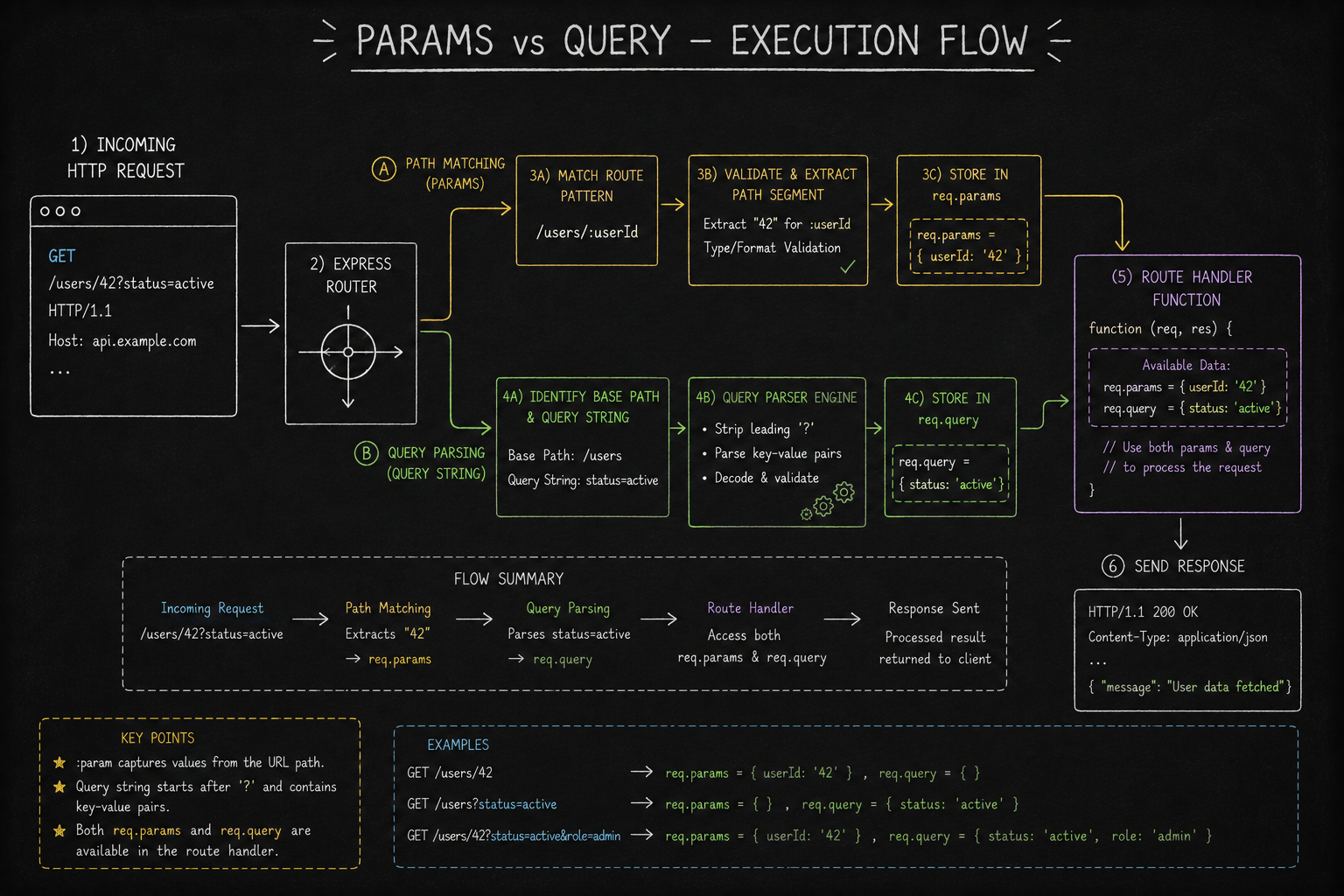
In Express, you declare a route parameter by prefixing a segment in your path string with a colon (:). When a request hits your server, Express automatically extracts that path value and attaches it to the req.params object.
const express = require('express');
const app = express();

// 1. ROUTE DEFINITION: The ':userId' segment acts as a dynamic placeholder
app.get('/users/:userId', (req, res) => {
    // 2. EXTRACTION: Express populates req.params with the path values
    const id = req.params.userId;

    // NOTE: All req.params values are strings by default!
    console.log(typeof id); // Output: "string"

    res.send(`Fetching user profile for User ID: ${id}`);
});

// 3. MULTIPLE PARAMETERS: You can nest multiple dynamic segments in a hierarchy
app.get('/users/:userId/posts/:postId', (req, res) => {
    // We can use ES6 object destructuring to extract both parameters cleanly
    const { userId, postId } = req.params;

    res.json({
        message: "Resource located successfully",
        requestedUser: userId,
        requestedPost: postId
    });
});

app.listen(3000, () => console.log("Server listening on port 3000"));
How Path Routing Behaves
If a client sends an HTTP GET request to /users/42, the :userId placeholder captures "42", and req.params becomes { userId: '42' }.
However, if the user navigates to /users/ without providing an ID, Express will not match this route. It will either fall back to a generic /users route if one exists, or return a 404 Not Found error. Route parameters are required for route matching.
2. What Are Query Strings? (The Modifiers)
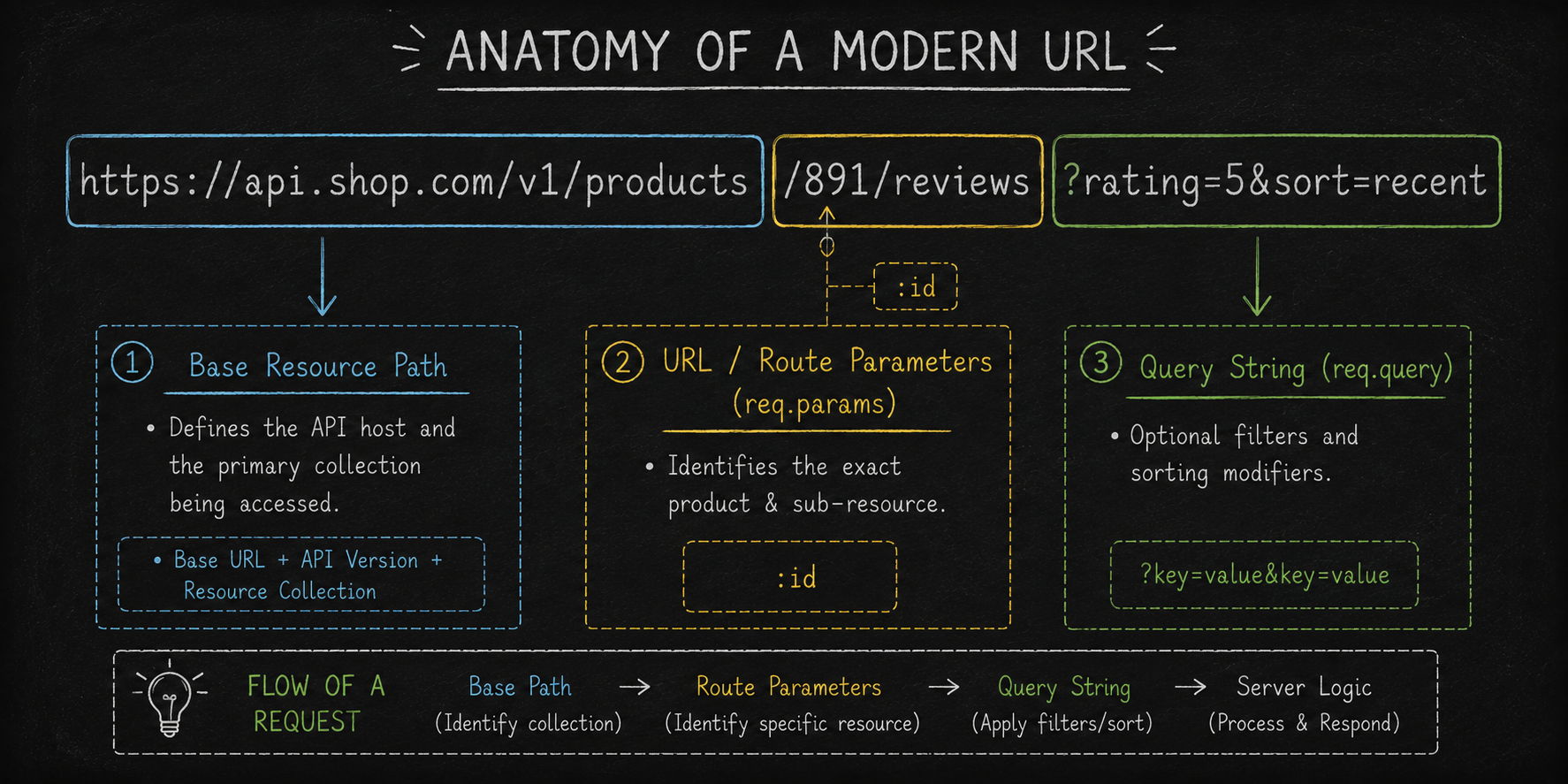
While route parameters are built into the backbone of the URL path, Query Strings (or Query Parameters) are appended to the very end of the URL after a question mark (?).
Query strings pass optional key-value pairs to the server. They do not change what base resource you are requesting; instead, they act as filters, search terms, pagination controls, or sorting instructions that modify the returned data.
Syntax and Structure
A query string follows a standardized pattern:[https://example.com/resource](https://example.com/resource)?key1=value1&key2=value2
The Question Mark (
?): Signals the end of the physical path and the start of the query parameters.The Key-Value Pair (
key=value): Sets a parameter name and its assigned value.The Ampersand (
&): Separates multiple key-value pairs.
Accessing Query Strings in Express
Express parses query strings automatically and attaches them as a clean JavaScript object on req.query. You do not need to declare query parameter names in your route definition.
const express = require('express');
const app = express();

// The route definition is simple: '/products'
// It matches regardless of what query parameters are added to the URL!
app.get('/products', (req, res) => {
    // Accessing parameters with default fallbacks (Best Practice)
    // URL Example: /products?category=electronics&limit=10&page=2
    const category = req.query.category; // "electronics"
    const limit = parseInt(req.query.limit) || 20; // Convert string to number, fallback to 20
    const page = parseInt(req.query.page) || 1; // Fallback to page 1

    res.json({
        filtersApplied: {
            category: category || "all",
            limit: limit,
            page: page
        },
        data: [] // Filtered database records would be returned here
    });
});

// Handling Arrays in Query Strings
// URL Example: /search?tags=javascript&tags=express&tags=nodejs
app.get('/search', (req, res) => {
    // When a key is repeated in the URL, Express parses req.query.tags as an ARRAY
    const tags = req.query.tags;

    console.log(Array.isArray(tags)); // Output: true
    console.log(tags); // Output: ['javascript', 'express', 'nodejs']

    res.json({ searchTags: tags });
});
3. Side by Side Comparison: Params vs Query
Understanding how req.params and req.query differ across key technical dimensions is critical for designing clean RESTful interfaces.
Technical Feature | Route Parameters (req.params) | Query Strings (req.query) |
URL Placement | Embedded inside the path string (e.g., | Appended after the |
Route Definition | Declared explicitly with colons in Express routes | Omitted from route definitions; parsed dynamically |
Route Matching | Required. Missing path segments cause 404s or alternate route matches | Optional. Adding or removing queries does not affect route matching |
Express Object |
|
|
Primary Intent | Identity: Uniquely locates a specific entity or sub-resource | Modification: Filters, sorts, paginates, or searches a dataset |
Parameter Order | Strict. The order of path segments cannot change | Arbitrary. Key-value pairs can appear in any sequence |
4. Architectural Decision Guide: When to Use Which?
When you are designing an endpoint, how do you decide whether a piece of data belongs in req.params or req.query?
Ask yourself this single rule-of-thumb question:
"If I remove this value from the URL, am I still requesting the exact same core resource?"
If NO: It is a Route Parameter. The data identifies what the resource is.
If YES: It is a Query Parameter. The data merely changes how the resource is displayed or filtered.
The Decision Matrix
Operational Scenario | Target URL Example | Parameter Strategy | Justification |
Fetch a single user by ID |
| Route Parameter ( | User |
Filter a user list by role |
| Query Parameter ( | The resource is still the |
Fetch a specific blog post slug |
| Route Parameter ( | The slug identifies the exact article to read. |
Paginate through articles |
| Query Parameter ( | Page 3 changes which slice of posts is returned, not the base |
Fetch orders for a specific user |
| Route Parameter ( | User |
Filter user orders by status |
| Both Combined | User |
5. Combining Both Patterns in Production
In real-world applications, you will often combine route parameters and query strings within a single Express route handler.
Here is a production-ready example demonstrating how to handle a nested resource (fetching articles written by a specific author) while applying dynamic filters (sorting and searching by keyword):
const express = require('express');
const app = express();

// ENDPOINT: Get articles written by a specific author, with optional filtering
// Example Request: GET /authors/john-doe/articles?search=nodejs&sort=views&order=desc
app.get('/authors/:authorSlug/articles', async (req, res) => {
    try {
        // 1. Extract MANDATORY Route Parameter (Identifies the resource context)
        const { authorSlug } = req.params;

        // 2. Extract OPTIONAL Query Parameters (Modifies the output array)
        // We set safe default values directly inside the destructuring statement
        const {
            search = '',
            sort = 'created_at',
            order = 'asc',
            page = 1,
            limit = 10
        } = req.query;

        // 3. Convert numeric query values safely from strings
        const pageNumber = Math.max(1, parseInt(page, 10));
        const limitNumber = Math.min(100, Math.max(1, parseInt(limit, 10))); // Cap max limit to 100

        // 4. Construct response payload reflecting both parameter sets
        res.status(200).json({
            status: "success",
            resourceContext: {
                author: authorSlug // Identified via req.params
            },
            queryControls: {
                searchTerm: search, // Captured via req.query
                sortBy: sort,
                sortOrder: order.toLowerCase() === 'desc' ? 'DESC' : 'ASC',
                pagination: {
                    currentPage: pageNumber,
                    itemsPerPage: limitNumber
                }
            },
            // Simulated database results
            results: []
        });

    } catch (error) {
        res.status(500).json({ error: "Internal Server Error" });
    }
});

app.listen(3000, () => console.log("Production API active on port 3000"));
Conclusion: Designing Clean, Self-Documenting APIs
Navigating data transfer in Express.js boils down to a clear division of labor. URL parameters define the structural skeleton of your routes, providing required identifiers that locate specific resources. Query strings sit at the end of the request, providing flexible, optional controls for filtering, searching, and paginating data.
By keeping resource identification in req.params and view modifications in req.query, you ensure your Express routes remain intuitive, readable, and aligned with standard REST architecture best practices.


