What is Middleware in Express.js and How It Works: The Complete Guide
Mastering the Assembly Line of Modern Backend Web Architecture

Imagine you are standing in line at an international airport, waiting to board an overseas flight.
Before you ever set foot on the plane, you don't just walk straight from the curb to your seat. You go through a specific sequence of security checkpoints:
Security Guard #1 checks your passport and boarding pass to make sure you are who you say you are.
Security Guard #2 runs your luggage through an X-ray scanner to ensure you aren't carrying anything dangerous.
Flight Attendant #3 stamps your ticket, assigns your seat, and finally lets you board.
If at any point Guard #1 finds an invalid passport or Guard #2 finds contraband, the process stops immediately. You are turned away, and you never reach the airplane.
In the world of web backend engineering, an Express.js application is that airport, the incoming HTTP Request is the passenger, the Route Handler is the airplane, and Middleware functions are those security checkpoints.
Middleware is the absolute foundation of how Express handles security, parses data, logs activity, and validates inputs. Let's pull back the curtain on how middleware operates under the hood, how execution order works, and how to write custom checkpoints for your applications.
1. What is Middleware in Express?
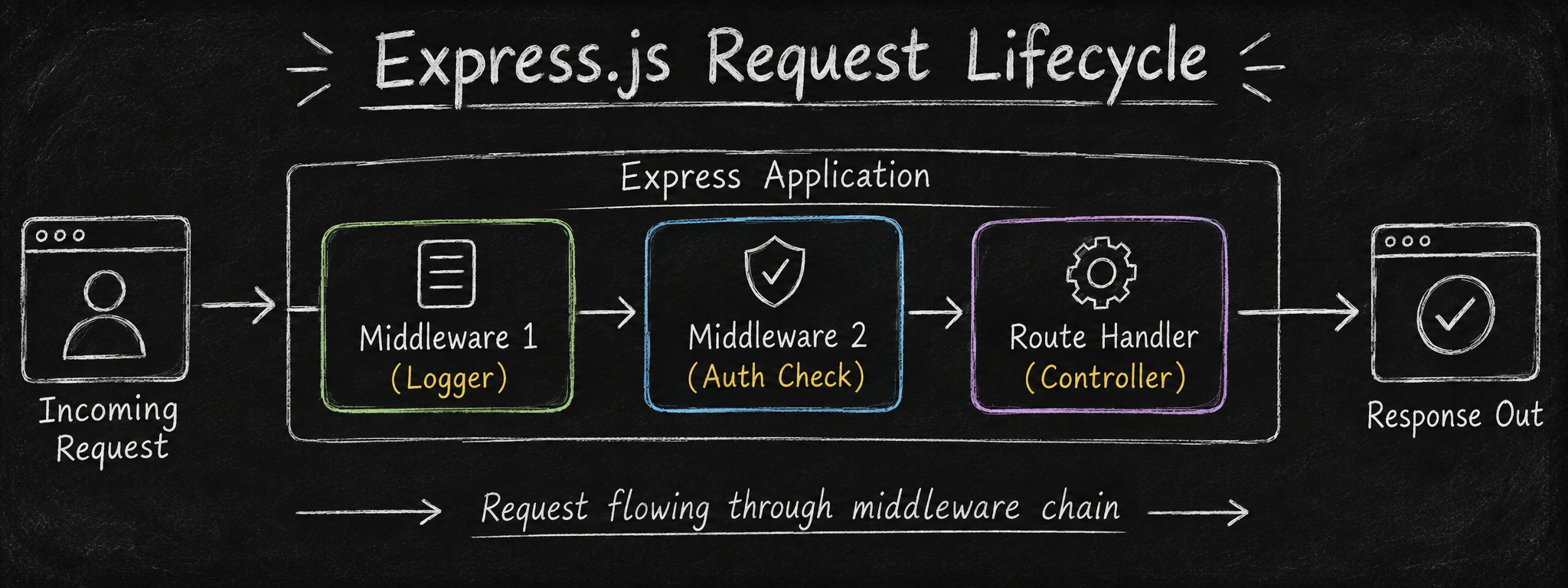
In Express.js, Middleware is simply a JavaScript function that sits between an incoming HTTP request and the final route handler (controller) that sends back a response.
Every middleware function has access to three core arguments:
req(Request Object): Represents the incoming HTTP request (headers, URL, body, parameters).res(Response Object): Represents the HTTP response being built (status codes, JSON, headers).next(The Next Function): A special callback function that, when executed, passes control to the next middleware checkpoint in the pipeline.
What Can Middleware Do?
A middleware function has total authority over the request-response lifecycle. It can:
Execute any code (e.g., calculate how long a request takes).
Modify the
reqandresobjects (e.g., parse a JSON body and attach it toreq.body, or attach authenticated user data toreq.user).End the request-response cycle (e.g., return a
401 Unauthorizedstatus instantly if a password is wrong).Pass control to the next checkpoint by invoking
next().
2. Where Middleware Sits in the Request Lifecycle
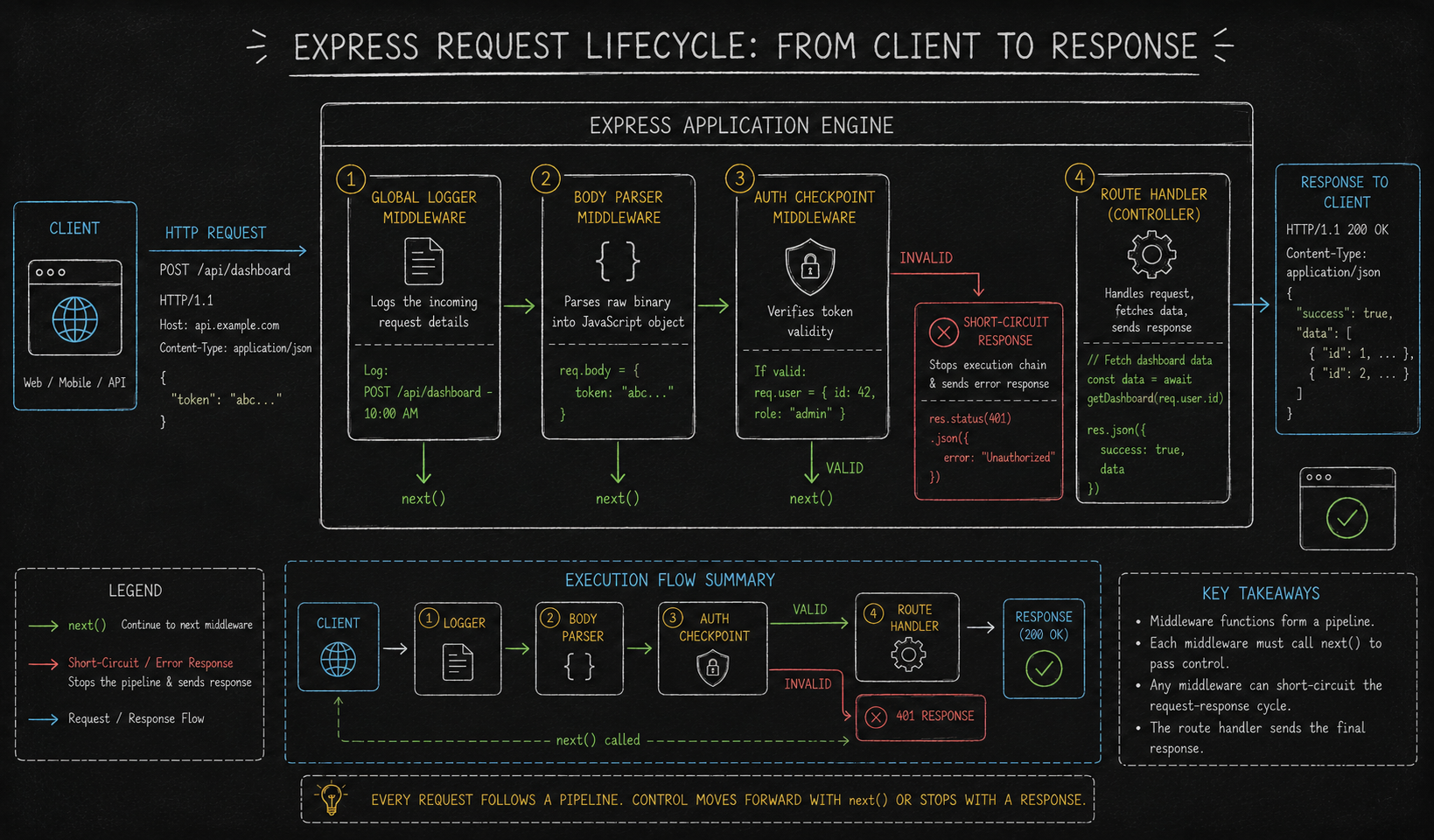
To understand the lifecycle, think of an Express application as a sequential processing pipeline or an assembly line.
When a client (like a web browser or mobile app) fires an HTTP request to your server, Express receives it and passes it through an ordered array of registered functions.
The Golden Rule of Execution Order
In Express, Registration Order = Execution Order.
Express does not automatically run security checks before logging just because it feels logical. Express simply reads your file from top to bottom and executes middleware in the exact sequence you register them using app.use() or app.METHOD().
const express = require('express');
const app = express();

// CHECKPOINT 1: Registered First -> Runs First!
app.use((req, res, next) => {
    console.log('1. I am the first checkpoint!');
    next(); // Hands off to Checkpoint 2
});

// CHECKPOINT 2: Registered Second -> Runs Second!
app.use((req, res, next) => {
    console.log('2. I am the second checkpoint!');
    next(); // Hands off to the Route Handler below
});

// ROUTE HANDLER: Registered Third -> Runs Third!
app.get('/hello', (req, res) => {
    console.log('3. I am the route handler!');
    res.send('Hello World!');
});

// CHECKPOINT 3: Registered AFTER the route handler -> WILL NEVER RUN for GET /hello!
app.use((req, res, next) => {
    console.log('4. I will be skipped because the route above already ended the cycle!');
    next();
});
3. The Central Role of the next() Function
If middleware functions are airport security officers, the next() function is the guard waving their hand and saying, "Step forward to the next line."
The next() callback is the control valve of Express. It accepts three distinct calling patterns:
1. next() (No Arguments)
Signals that the current function has completed its work without errors. Express immediately moves down the stack to the very next registered middleware or route handler.
2. next(error) (Passed an Error Object)
Signals that something went wrong (e.g., database failure, invalid token). Express instantly skips all remaining standard middleware and route handlers in the pipeline and jumps directly to your designated Error-Handling Middleware.
3. next('route')
Bypasses any remaining middleware inside the current route block and jumps directly to the next matching route definition (works specifically inside app.METHOD() or router.METHOD()).
The Infamous "Hanging Request" Bug
What happens if a middleware function forgets to call next() AND forgets to send a response back with res.send() or res.json()?
// BUG EXAMPLE: The Endless Loading Spinner
app.use((req, res, next) => {
    console.log('Processing request...');
    // FORGOT TO CALL next()!
    // FORGOT TO CALL res.json()!
});
The Result: The request gets trapped at this checkpoint forever. The client's browser tab will show a spinning loading icon until it eventually hits a network timeout error. Every middleware must either call next() to pass the baton or return a response (res) to end the cycle.
4. The 5 Main Types of Express Middleware
Not all middleware serves the same architectural scope. Express categorizes middleware into five primary structural types:
Type 1: Application-Level Middleware
Bound directly to the root app instance using app.use() or app.METHOD(). These run for every incoming request across your entire application unless restricted by a path prefix.
const express = require('express');
const app = express();

// Global Logger: Runs on EVERY single request to ANY endpoint
app.use((req, res, next) => {
    console.log(`[GLOBAL LOG] ${req.method} ${req.url} at ${new Date().toISOString()}`);
    next();
});

// Path-Specific Application Middleware: Runs ONLY on requests starting with '/api/v1'
app.use('/api/v1', (req, res, next) => {
    console.log('API Subsystem Accessed');
    next();
});
Type 2: Router-Level Middleware
Bound to an isolated instance of express.Router(). This allows you to modularize your codebase into distinct feature folders (e.g., userRoutes.js, adminRoutes.js) and apply security checkpoints strictly to those feature domains.
const express = require('express');
const router = express.Router();

// Router Middleware: Runs ONLY for routes declared on this specific router
router.use((req, res, next) => {
    console.log('Admin Domain Checkpoint: Verifying Admin Credentials...');
    next();
});

// Define admin sub-routes
router.get('/dashboard', (req, res) => res.send('Admin Dashboard'));
router.get('/settings', (req, res) => res.send('Admin Settings'));

// Mount router on main app
const app = express();
app.use('/admin', router); // All /admin/* routes will trigger the router-level middleware above
Type 3: Built-in Middleware
Framework-provided utilities included natively inside the core Express package. You do not need to install extra npm packages to use these:
Built-in Middleware | Core Functionality |
| Intercepts incoming requests with JSON payloads and parses them into |
| Parses URL-encoded form submissions from standard HTML forms into |
| Serves static assets (images, CSS, frontend JS files) from a designated folder. |
// Enabling native body parsing and static file serving
app.use(express.json()); // Parses application/json
app.use(express.urlencoded({ extended: true })); // Parses application/x-www-form-urlencoded
app.use(express.static('public')); // Exposes 'public' folder assets
Type 4: Third-Party Middleware
Community-maintained open-source packages installed via npm to solve common backend concerns without reinventing the wheel:
cors: Enables Cross-Origin Resource Sharing for frontend client apps.helmet: Sets secure HTTP response headers to protect against common web vulnerabilities.morgan: Automatically formats and color-codes HTTP request logs in your terminal.cookie-parser: Parses incoming HTTP header cookies into a cleanreq.cookiesobject.
const helmet = require('helmet');
const cors = require('cors');
const morgan = require('morgan');

app.use(helmet()); // Enable security headers
app.use(cors()); // Allow cross-origin requests
app.use(morgan('dev')); // Log requests in clean developer format
Type 5: Error-Handling Middleware
Express reserves a special type of middleware for catching runtime errors. While standard middleware takes 3 arguments (req, res, next), Error-handling middleware MUST take exactly 4 arguments: (err, req, res, next).
Express identifies error handlers strictly by checking function argument length (length === 4). It must always be registered at the very bottom of your middleware stack, after all your standard routes.
// STANDARD ROUTE: Throws an error or passes it via next(err)
app.get('/broken-route', (req, res, next) => {
    const error = new Error('Database connection failed!');
    next(error); // Jumps straight past all normal routes to the error handler
});

// GLOBAL ERROR-HANDLING MIDDLEWARE (Notice the 4 parameters!)
app.use((err, req, res, next) => {
    console.error('CRITICAL ERROR CAPTURED:', err.message);

    res.status(500).json({
        success: false,
        error: err.message || 'Internal Server Error'
    });
});
5. Middleware Decision Matrix: Architectural Pipeline Order
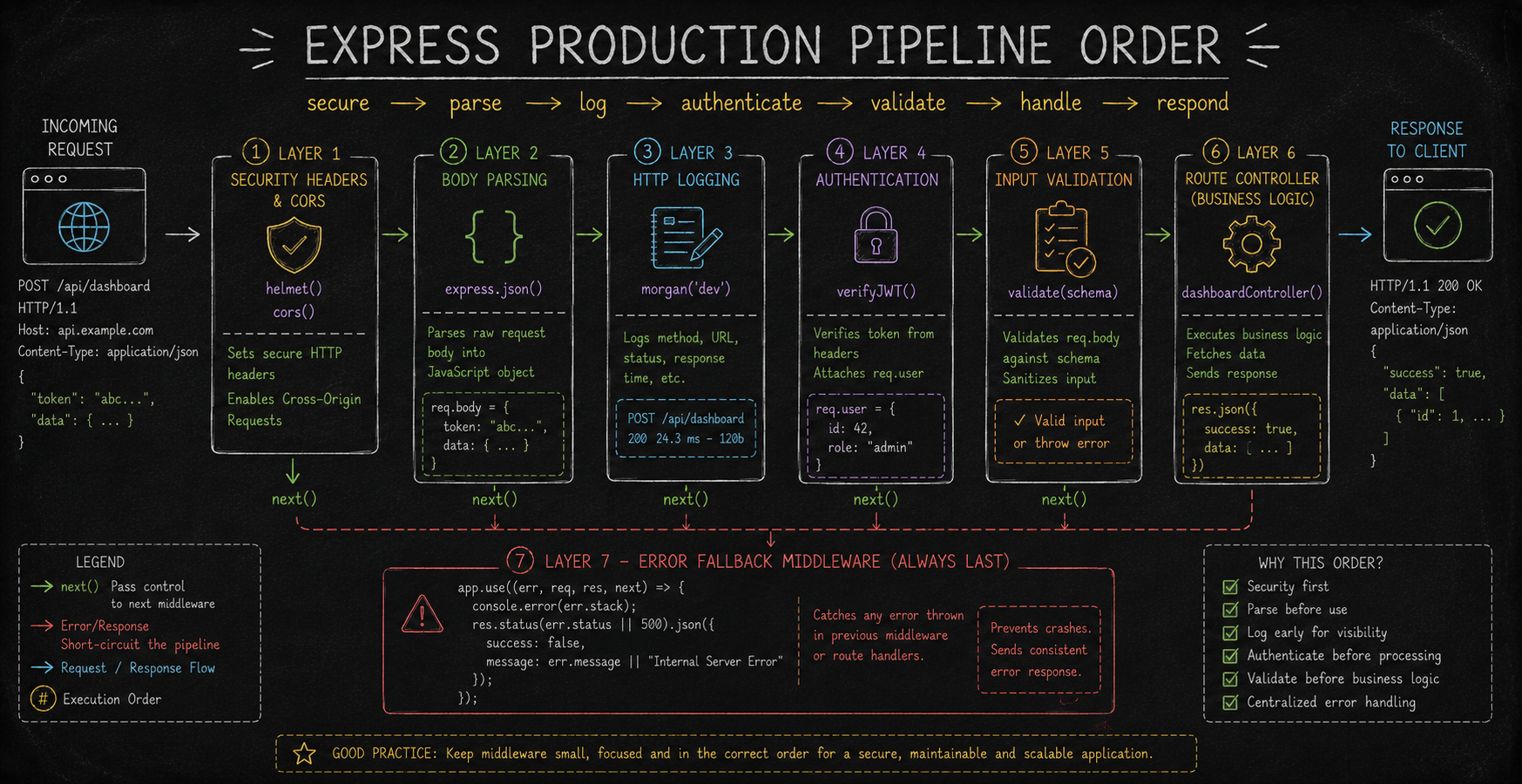
How do you organize multiple middleware layers cleanly in a real-world production app? Follow this standardized pipeline sequence to avoid common bugs like trying to validate a body before it has even been parsed:
The Middleware Order Reference Matrix
Recommended Sequence | Middleware Category | Example Tool / Logic | Architectural Purpose |
1. First Contact | Security & CORS |
| Secure HTTP headers and manage origin access before allocating memory to parse bodies. |
2. Ingestion | Body Parsers |
| Convert incoming network streams into structured JavaScript objects on |
3. Monitoring | Request Loggers |
| Log incoming IP, method, status, and execution duration for system observability. |
4. Security Check | Authentication | Custom JWT / Session Validator | Intercept unauthorized requests early before wasting CPU cycles on route logic. |
5. Input Sanity | Schema Validation | Joi / Express-Validator | Ensure parsed |
6. Business Domain | Route Handlers |
| Execute core application logic, query database, and issue responses. |
7. Final Catch-All | Error Handler |
| Catch any uncaught runtime exceptions or |
6. Real-World Implementations: Building 3 Essential Custom Middlewares
Let's put everything together by building three production-ready, custom middleware utilities: a Request Logger, a JWT Authentication Guard, and a Request Input Validator.
Real-World Example 1: Custom Request Logger with Duration Tracking
// Custom Logging Middleware
const requestDurationLogger = (req, res, next) => {
    const startTimestamp = Date.now();

    // Listen for the 'finish' event on the response stream (Fired when response is sent)
    res.on('finish', () => {
        const elapsedTime = Date.now() - startTimestamp;
        console.log(`[HTTP LOG] ${req.method} ${req.originalUrl} | Status: ${res.statusCode} | Duration: ${elapsedTime}ms`);
    });

    next(); // Pass control to the next checkpoint immediately!
};

// Usage
app.use(requestDurationLogger);
Real-World Example 2: JWT Authentication Guard Middleware
const jwt = require('jsonwebtoken');

// Authentication Guard Checkpoint
const authenticateToken = (req, res, next) => {
    // 1. Extract Authorization header ('Bearer <TOKEN>')
    const authHeader = req.headers['authorization'];
    const token = authHeader && authHeader.split(' ')[1];

    // 2. Short-circuit if no token was provided
    if (!token) {
        return res.status(401).json({ error: 'Access Denied: No authentication token provided.' });
    }

    // 3. Verify token validity
    jwt.verify(token, process.env.JWT_SECRET || 'supersecretkey', (err, decodedUser) => {
        if (err) {
            // Short-circuit if token is expired or tampered with
            return res.status(403).json({ error: 'Forbidden: Invalid or expired token.' });
        }

        // 4. ATTACH PAYLOAD TO REQUEST: Make decoded user info available to subsequent handlers!
        req.user = decodedUser;

        next(); // Authorization verified! Proceed to route controller.
    });
};

// Usage: Apply strictly to protected routes
app.get('/api/v1/dashboard', authenticateToken, (req, res) => {
    res.json({ message: `Welcome back, User ${req.user.id}!` });
});
Real-World Example 3: Schema Input Validation Middleware
// Reusable Schema Validator Factory Function
const validateRequestBody = (requiredFields) => {
    return (req, res, next) => {
        const missingFields = [];

        // Check if all mandatory fields exist on req.body
        requiredFields.forEach(field => {
            if (!req.body || req.body[field] === undefined) {
                missingFields.push(field);
            }
        });

        // If any required field is missing, short-circuit with a 400 Bad Request
        if (missingFields.length > 0) {
            return res.status(400).json({
                error: 'Validation Failed',
                missingFields: missingFields
            });
        }

        next(); // Input data is clean! Proceed to controller.
    };
};

// Usage: Pass an array of required field keys
app.post('/api/v1/register', validateRequestBody(['email', 'password', 'username']), (req, res) => {
    // Guaranteed that req.body contains email, password, and username here!
    res.status(201).json({ message: 'User registered successfully!' });
});
Conclusion: The Modular Power of Express
Express.js owes its massive popularity to a simple architectural concept: everything is a middleware.
By treating requests as items moving down an assembly line, Express allows you to keep your controllers clean, thin, and focused purely on business logic. Security, data parsing, logging, and error handling are modularized into reusable checkpoints. Master the middleware pipeline, maintain strict execution order, and always call next(), and you will have full control over your backend application architecture.


