Behind the Tab: A Beginner’s Guide to How Browsers Work
From URL to Pixels: Understanding the Architecture of the Modern Web

Have you ever wondered what actually happens in that split second after you type google.com and hit Enter? To most, it feels like magic , a page just "appears". But under the hood, your browser is performing one of the most complex engineering feats in modern software.
Think of a browser not just as a window to the web, but as a high-speed factory. It takes raw materials (code), processes them through various assembly lines, and delivers a finished product (a website) to your screen.
1. What is a Browser, Really?
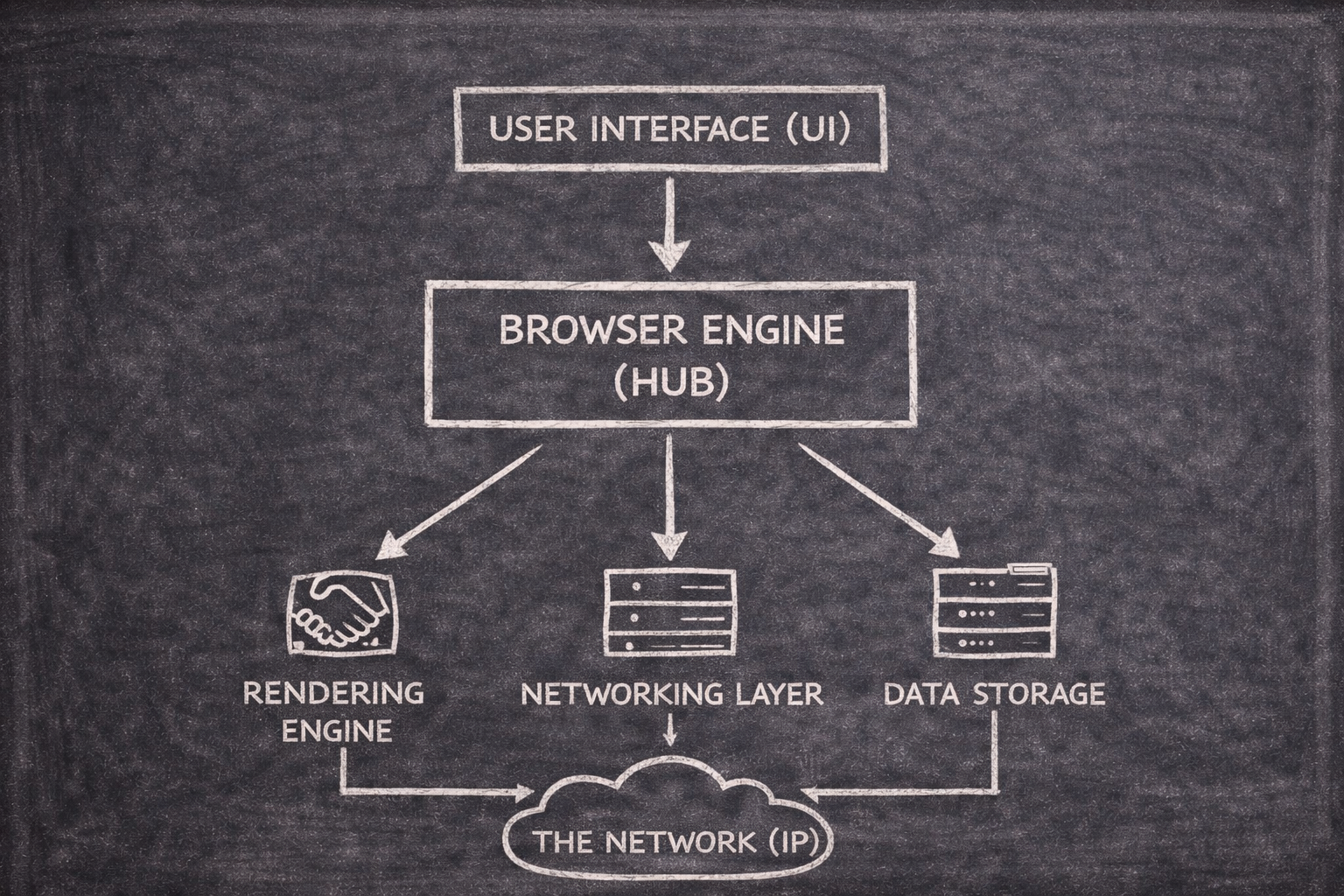
Beyond just "opening websites" , a browser is a sophisticated User Agent. Its primary job is to fetch resources from a server and translate them into something a human can interact with.
While we often confuse them, a Browser is the vehicle (like Chrome or Firefox), while a Search Engine is the map (like Google or Bing) that helps the vehicle find a destination.
The Anatomy of a Browser
A browser is a collection of components working in perfect harmony:
User Interface (UI): The parts you touch - the address bar (Omnibox), tabs, and back buttons.
The Engine Room: The Browser Engine acts as the coordinator, while the Rendering Engine does the heavy lifting of drawing the page.
The Brain: The JavaScript Engine (like Google's V8) executes the logic that makes pages interactive.
UI Backend: This essential module draws basic widgets like checkboxes, dropdowns, and windows by utilizing the operating system’s native graphics routines.
2. The Networking Handshake
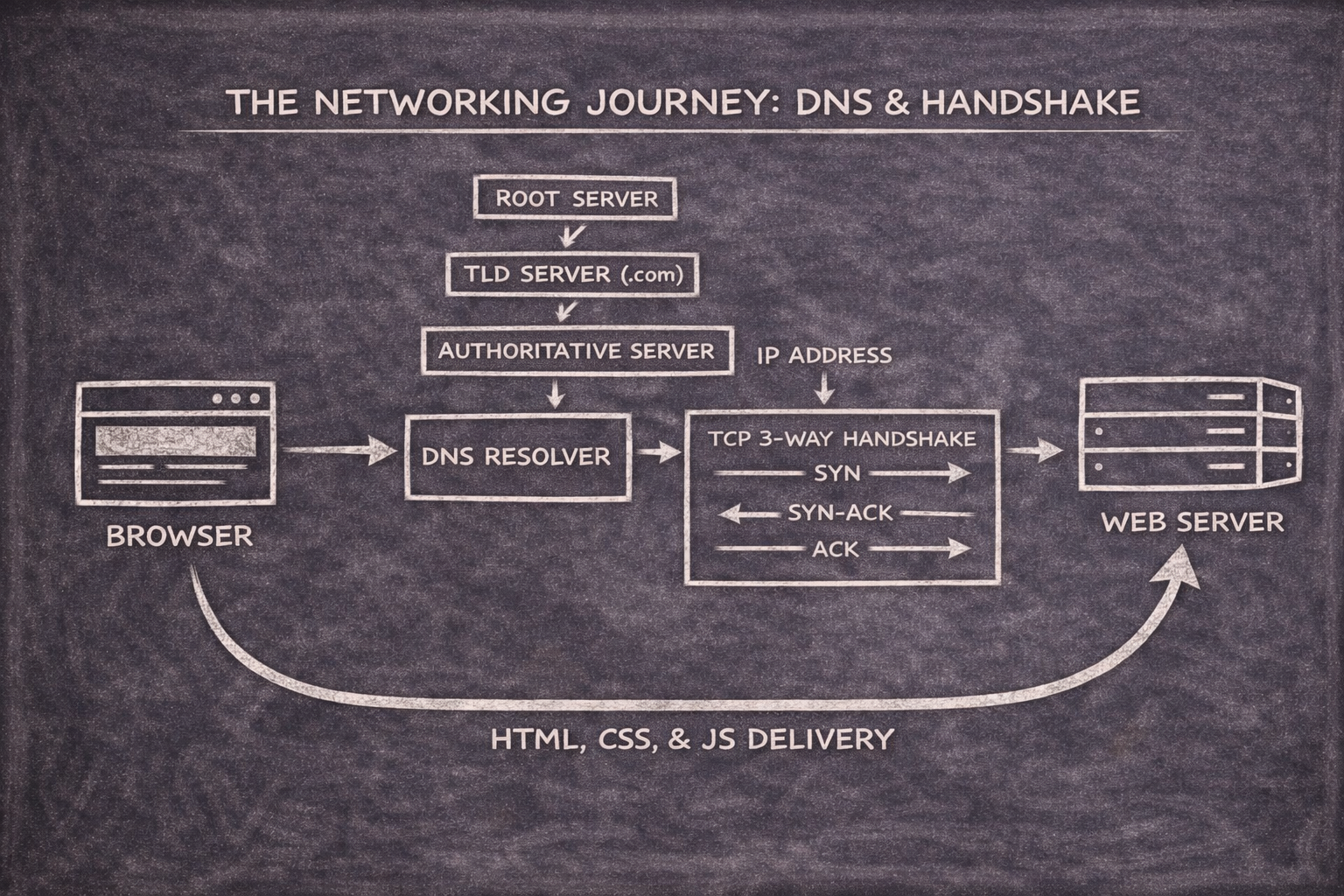
Before the browser can draw anything, it needs the "blueprints" (HTML, CSS, and JS) from the server. This happens in the Networking Layer:
DNS Lookup: The browser turns the human-friendly URL into a machine-friendly IP address.
TCP/TLS Handshake: TCP handshake establishes the connection; TLS (if HTTPS) secures it.
The Request: The browser asks the server, "Hey, can I have
index.html?".The Payload: The server sends back the raw bytes of the website.
3. Parsing: Turning Text into Meaning
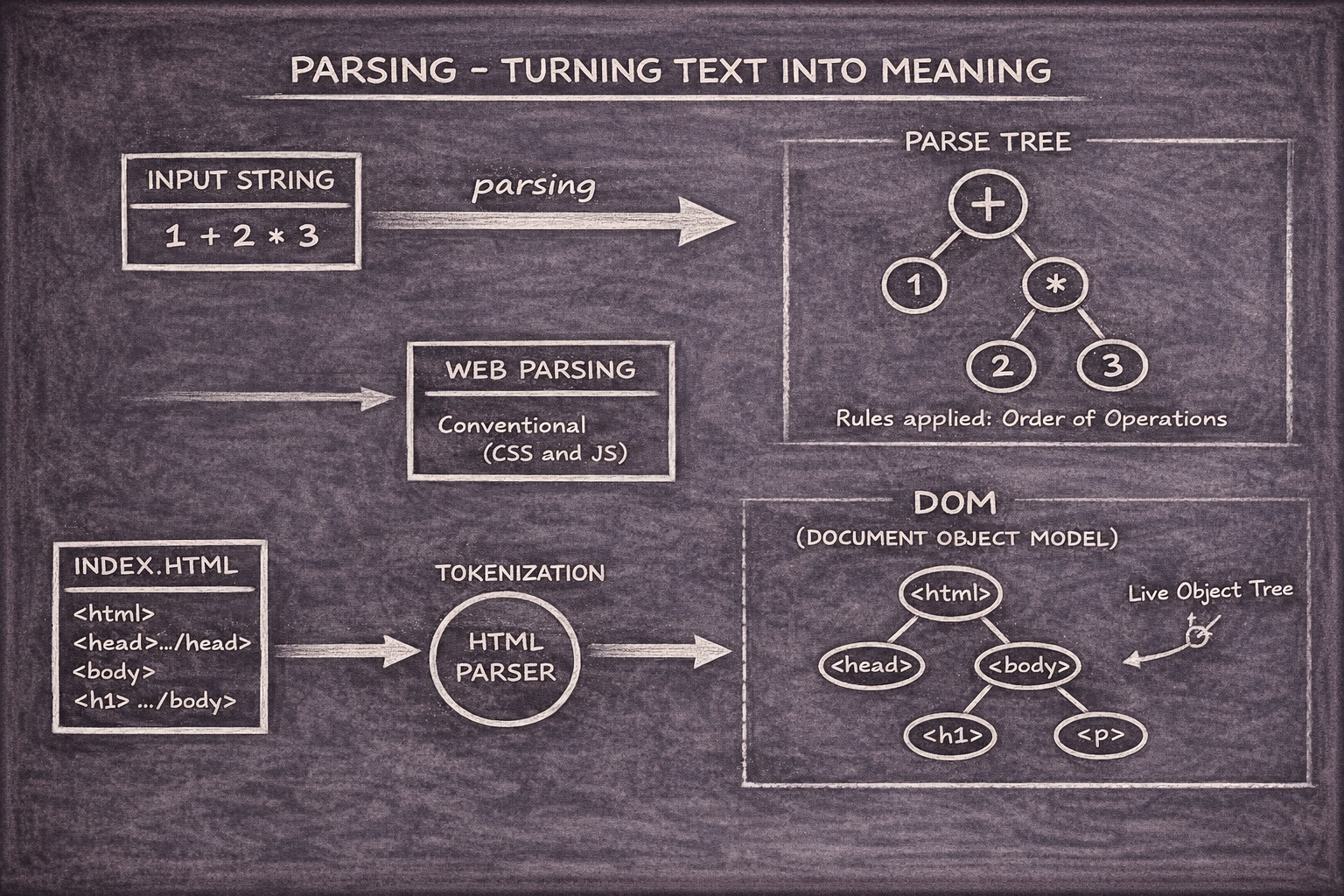
Computers don't "read" code like we do; they parse it. Parsing is the process of breaking down text into a structured tree that the computer understands.
Take the math expression: 3 + 4 * 5. A parser breaks this into "tokens" (the numbers and symbols) and builds a tree where 4 * 5 is grouped first because of math rules.
Building the DOM (The Tree of Content)
As the browser receives HTML, it turns it into the Document Object Model (DOM).
Tokens:
<html>,<body>,<h1>are identified.Nodes: Each token becomes a "node" in a parent-child hierarchy.
The Tree: The result is a live, tree-like structure representing every element on your page.
4. CSSOM: The Tree of Style
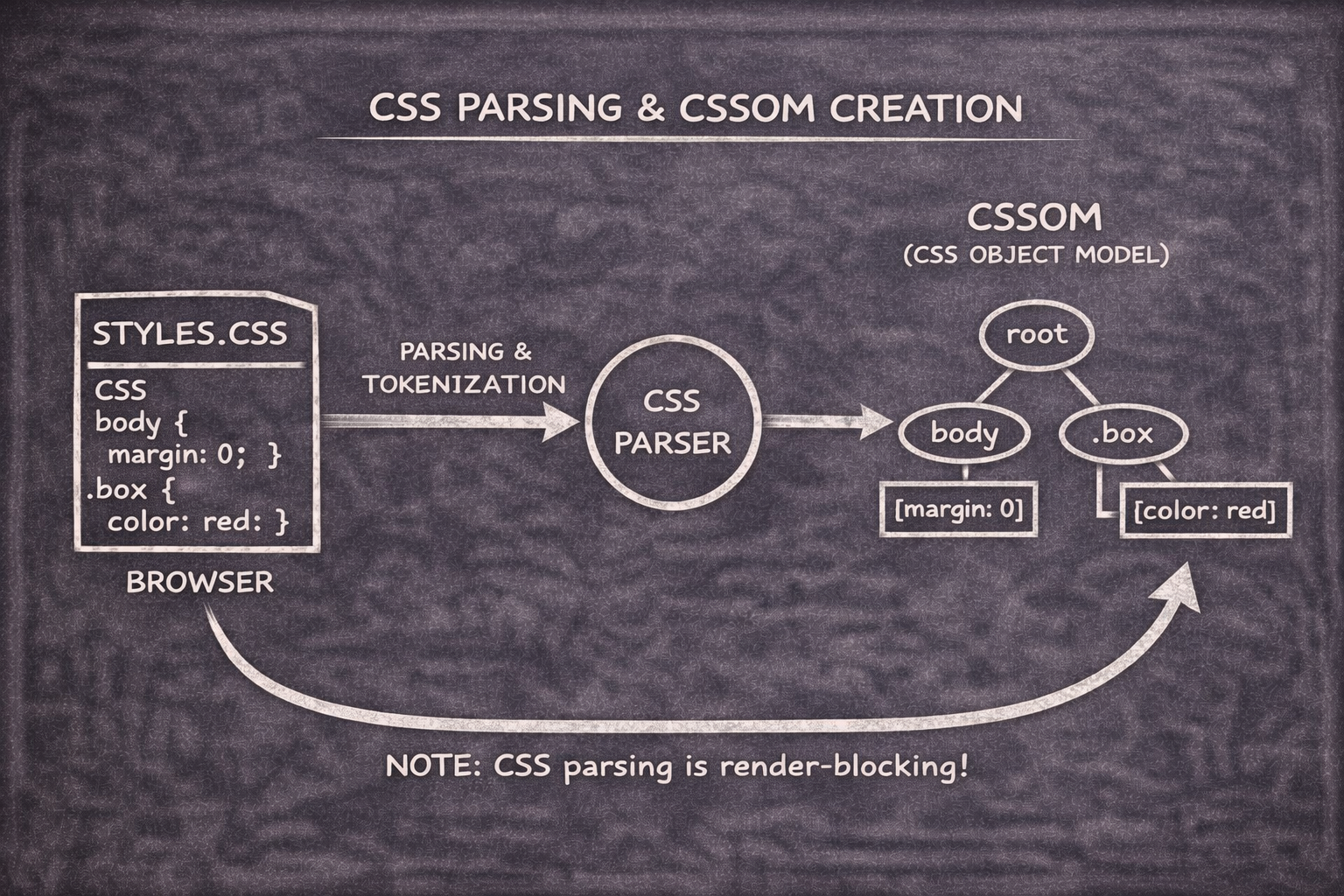
While the DOM handles the what, the CSSOM (CSS Object Model) handles the how. The browser parses your CSS files into a similar tree structure, computing exactly which styles apply to which elements.
Note: CSS is "render-blocking". The browser won't show the page until the CSSOM is ready, otherwise, you'd see a flash of unstyled, ugly text!
5. The Critical Rendering Path: URL to Pixels
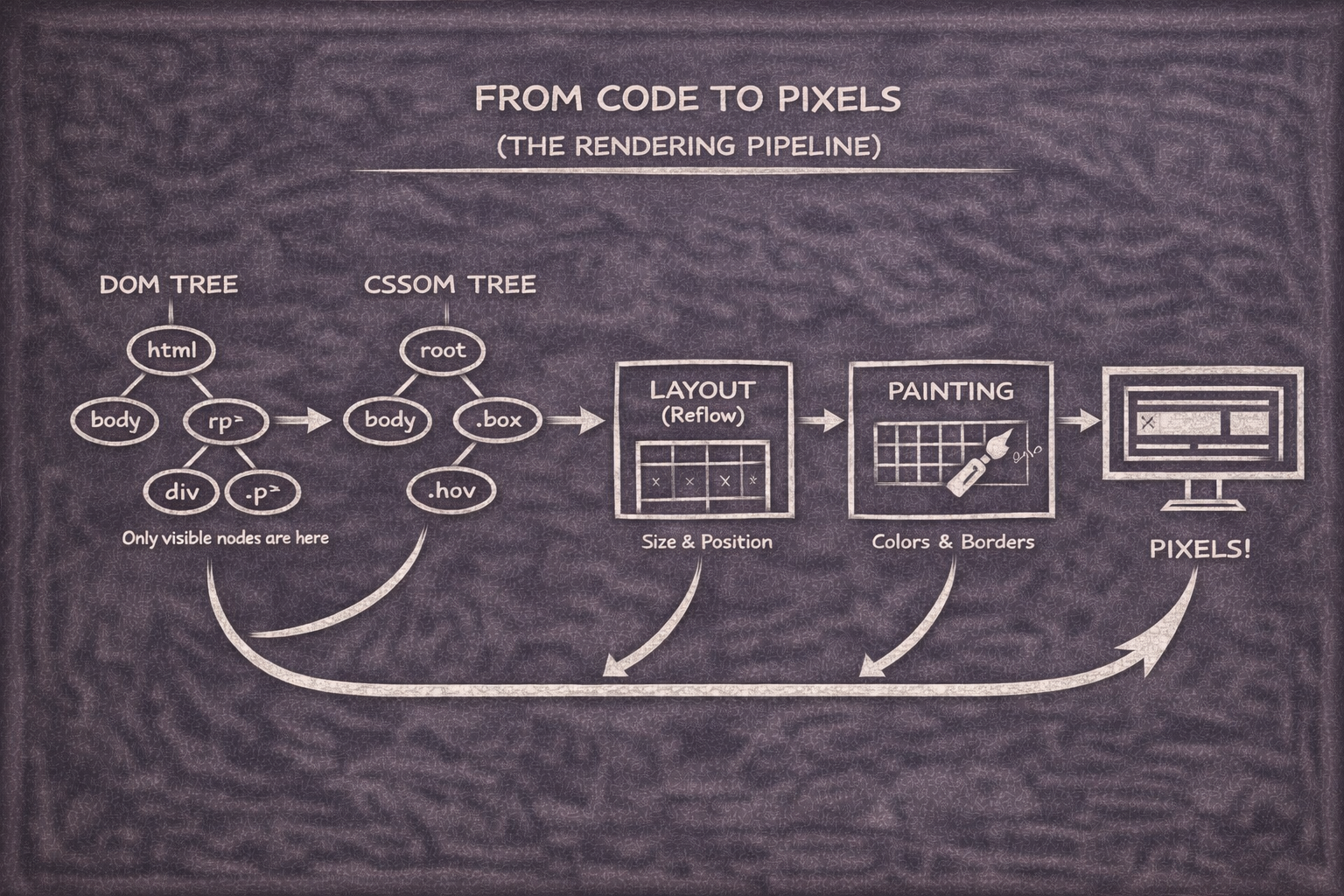
This is the "assembly line" where everything comes together:
The Render Tree: The browser combines the DOM and CSSOM. It ignores things that aren't visible (like
<script>tags or anything withdisplay: none).Layout (Reflow): The browser calculates the exact geometry of every element - how many pixels wide is that box? Where exactly is the "Login" button?
Painting: The browser fills in the pixels - colors, borders, shadows, and text.
Display: Finally, the finished frames are sent to your GPU and displayed on your screen.
Conclusion: The Modern Engineering Marvel
Every time you interact with a web app, this entire cycle repeats , sometimes dozens of times per second if there are animations.
Understanding browser internals isn't just for experts; it makes you a better developer. When you know that CSS blocks rendering or that JavaScript blocks parsing, you can write code that feels "snappy" and professional.


